The Vault Outlives the Agent: Why Your Second Brain Needs a Protocol
Most AI second-brain setups encode conventions inside one agent's prompt. The vault drifts as the agent forgets the rules. brainkeeper puts the conventions in a spec the vault enforces.
You set up your second brain vault. Whatever folders, naming, and tagging conventions work for how you think. Then you teach your AI agent the rules, usually through an instructions file like CLAUDE.md. You add a few custom commands for the things you do every day. For the first week, it’s magic. The agent creates properly-shaped notes that fit your structure without you thinking about it.
Then the drift starts.
In week three the agent tags a note meeting instead of meetings/weekly-sync, because that’s what felt natural in the moment. In month two it forgets to fill in metadata fields on five notes during a long session. In month four a project log lands in inbox/ because the agent decided that “things to think about” go there. By month six you’re spending Sundays cleaning up notes the agent shaped wrong.
The conventions in your CLAUDE.md are advice. The agent reads them, then drifts away from them under context pressure or just because the next plausible token didn’t match the rule. Multiply by hundreds of notes and the vault is a quiet mess.
A different version of this problem hits if you ever switch agents. Move from Claude Code to Codex, paste your CLAUDE.md into its prompt, and the conventions reset to a slightly different shape. Same root cause: the rules live in the agent’s prompt, where each agent (and each session) interprets them on its own.
Your second brain shouldn’t depend on the prompt being followed correctly every session, this year and next.
The data outlives the tool. You’ll spend a decade with the same notes (or longer; the older notes go back further). The conventions that make a vault a second brain instead of a graveyard of notes belong with the data, not in any one agent’s prompt.
This article is about what happens when you take that idea seriously and rebuild your vault interface as a protocol.
The failure mode of “just prompt the agent”
The natural first move is to teach the agent. Most knowledge-management setups today work this way. Open Claude Code, write a CLAUDE.md. Open Cursor, write rules. Open Codex, write AGENTS.md. The instructions live in the agent’s runtime. The vault is just files; the conventions are prompts.
I wrote a long article about this approach a few weeks ago, Your Obsidian Vault Is a Database. Claude Code Is the Query Language. Six folders, a CLAUDE.md instruction file, custom slash commands for the things you do every day. It’s a great starting point. It’s where I started.
But it breaks in five specific ways once you start using it seriously.
Drift across sessions. This is the one most people feel first. “Follow these conventions” is a soft constraint. The agent might add created: 2026-05-03 one day and created_at: 2026-05-03 the next, depending on what context window pressure made it forget. Tags drift between forms (meeting vs meetings/weekly-sync), required metadata fields go missing, the same kind of note ends up in two different folders depending on the session. Multiply by a few hundred notes and the vault is a quiet mess.
No enforcement at write-time. A prompt is advice. The agent is free to ignore it. There’s nothing in the loop that says “this write fails if the frontmatter is malformed”. Bad data lands in the vault and stays there until you find it.
Discovery cost on a 1000-note vault. When the agent needs to find every note tagged meeting, it runs a grep. Every query starts by reading the entire vault. The bigger the vault gets, the slower (and more expensive in tokens) every operation becomes.
Race conditions. You’re editing a note in Obsidian. The agent in another window edits the same note. One write wins; the other is silently lost. There’s no protocol for “I read this file at mtime X, abort if it’s changed”.
Cross-agent loss (the version of this you’ll hit eventually). Your CLAUDE.md is in Claude Code’s syntax. Codex reads AGENTS.md. Cursor reads its own rules file. Each agent has its own instruction format and its own slash command system. Once you try a second agent, you’re rewriting the conventions in a new dialect every time. This one is rarer because most people stick with a single tool, but it makes the same point as the others: rules in a prompt are tied to one agent’s runtime.
These aren’t theoretical. They’re what you hit when the manual approach scales past a hundred notes and a single agent. What we need isn’t a smarter prompt. It’s a layer that sits below the prompt.
The missing layer: a spec the vault owns
Markdown won as a note-taking format because it’s a format, not a product. You can open a Markdown file in any text editor on any operating system. You can grep it, version it in git, attach it to an email, paste it into a wiki. The fact that Obsidian is built on Markdown means Obsidian is replaceable. If Obsidian disappeared tomorrow, your notes would still open in vim.
YAML frontmatter won by the same logic. It’s a contract between writer and reader: the part between the --- lines is structured data, the part after is prose. Every Markdown tool that respects this contract reads frontmatter the same way. Hugo, Jekyll, Astro, Obsidian, VS Code with the right extension, your custom Python script. Same notes, same frontmatter, same meaning.
The vault format already won. Folder of .md files, YAML frontmatter on managed notes, a folder layout that makes sense to humans. That part is settled.
What never settled is the protocol for AI access. How does an agent know where to write a new note? Which fields the frontmatter needs? Whether delete means “remove from disk” or “move to archive/2026/”? Today every agent answers these questions independently, by reading the user’s instructions in whatever format that agent happens to support.
Conventions live in three places, and the difference matters:
| Where conventions live | Holds across sessions and agents? | Schema validated on write? | Scales beyond one user? |
|---|---|---|---|
Agent’s system prompt (CLAUDE.md, AGENTS.md) | No | No | No |
| Your head | No | No | No |
| A spec the vault owns | Yes | Yes | Yes |
“Schema validated” means the structural contract: required frontmatter fields, types, lifecycle rules. brainkeeper rejects writes that violate them. It does not enforce semantic conventions like tag value shape (you can still use meeting or meetings/weekly-sync freely; the spec doesn’t pick one for you), file naming, or whether a project log “feels right” in inbox/. Some judgment stays with the agent. But the structural floor is now non-negotiable, which is what was missing.
A spec the vault owns is the only place that survives. The agent comes and goes. The conventions don’t.
This is what brainkeeper is. A protocol that lives next to your notes, exposed via an MCP server. Every AI agent that supports MCP gets the same vault contract automatically. The conventions don’t live in any agent’s prompt anymore. They live in a JSON Schema and an MCP tool surface that every agent talks to the same way.
Introducing brainkeeper
brainkeeper is two things: a spec, and a reference Python implementation that ships an MCP server.
The spec
brainkeeper.yaml lives at the root of your vault. It describes the layer layout (six PARA-style folders by default, extensible) and the routing rules. The companion SPEC.md defines:
- Layer keys:
inbox,journal,projects,areas,brain,archive. Each key maps to a folder name (which can be00 Inbox,Inbox,inbox/, anything you want; just declare it once inbrainkeeper.yaml). - Frontmatter contract: every managed note has at minimum
created(ISO date),updated(ISO date, ≥ created), andtags(≥1 entry). Extra fields pass through unchanged. - Lifecycle rules: atomic writes, mtime guards on overwrites, soft delete moves to
<archive>/<YYYY>/,updatedrefreshes on every write. - Templates: per-layer templates live in
<layer>/_templates/, excluded from indexing.
The spec is in a public repo. Anyone can implement against it. Implementations in other languages would be welcome.
The reference implementation
The Python package ships an MCP server with 13 tools across 3 layers:
Primitives (file operations): read_note, list_notes, write_note_atomic, move_note, delete_note.
Convention (spec-aware lookups): read_convention, list_layers, get_template, resolve_path.
Semantic (spec-level queries): find_by_tag, find_orphans, validate_frontmatter, update_frontmatter, list_tags.
Every operation goes through the spec. write_note_atomic validates frontmatter against the schema; the write fails if it’s malformed. delete_note(soft=True) moves to the archive folder per spec. find_by_tag queries an in-memory index that watches the vault and updates as files change, so a 10,000-note vault answers tag queries in milliseconds, not seconds.
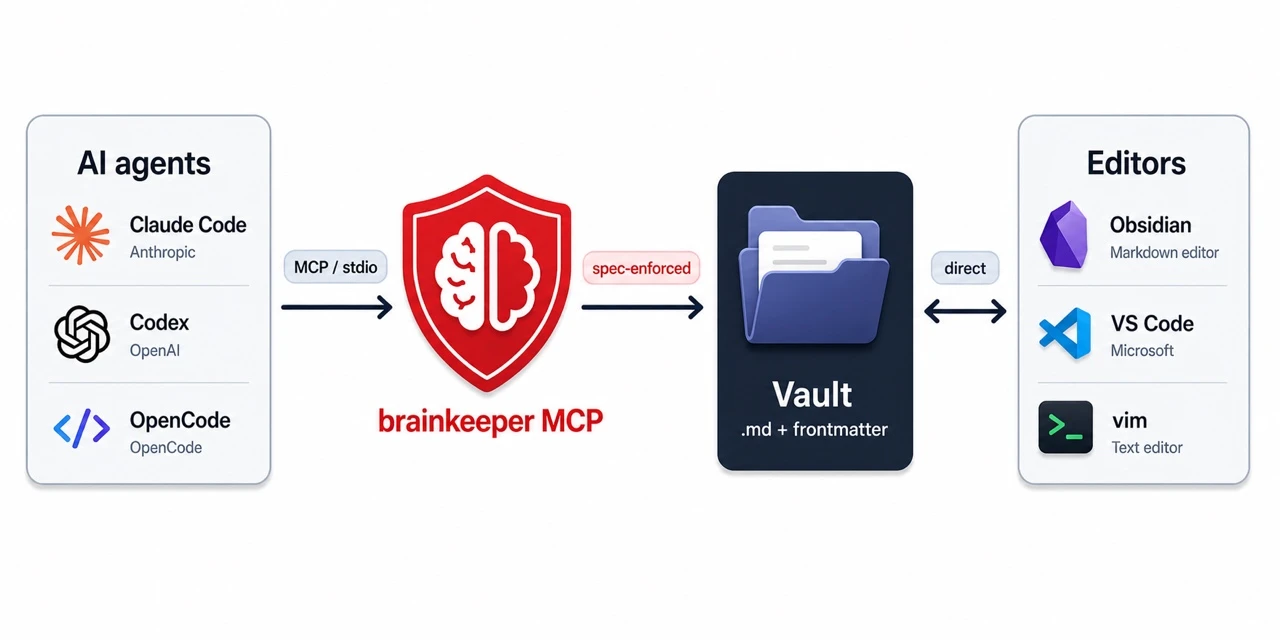
The MCP is the spec-enforcement layer for AI agent access. Humans (you, in Obsidian or VS Code) keep writing to the vault directly; nothing changes for the human side. Only the agent path is mediated.
Tutorial: 5 minutes to try it
Five minutes from pip install to your first agent-managed note.
1. Bootstrap a vault
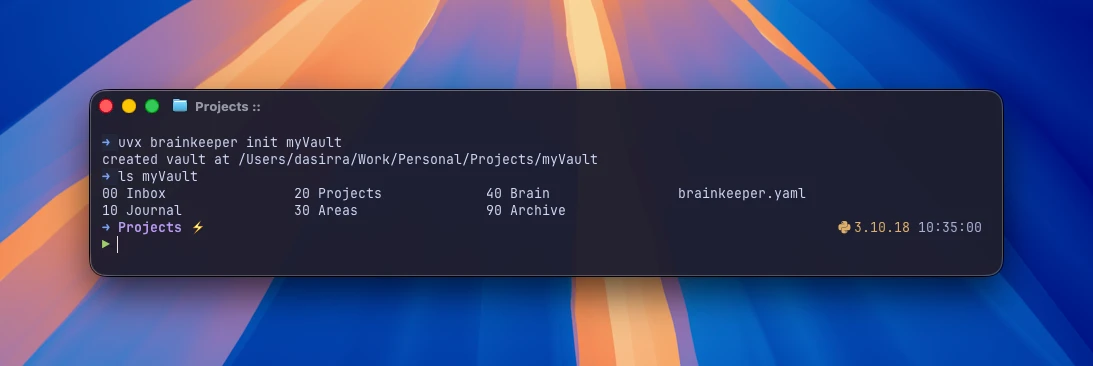
uvx brainkeeper init ~/MyVaultThis drops a brainkeeper.yaml at the root and creates the six layer folders with their default names. Open the YAML if you want to rename them (e.g., inbox: "00 Inbox" instead of inbox: "inbox"); the spec lets you customize freely.
2. Register with your agent
For Claude Code (the registration command varies per agent; the result is the same):
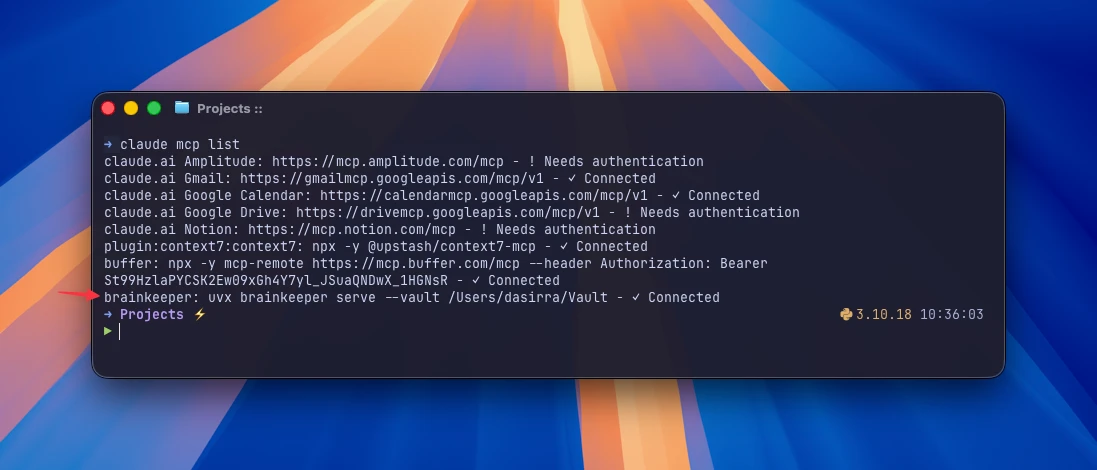
claude mcp add --scope user brainkeeper -- uvx brainkeeper serve --vault ~/MyVaultuvx fetches brainkeeper from PyPI on demand and runs it. No installation, no virtualenv to manage. Restart your agent, and it gains a brainkeeper toolset.
3. Try it
Ask your agent something:
“Capture this as a note: I should compare ACP and MCP for agent orchestration.”
The agent calls resolve_path (the new note routes to inbox/), write_note_atomic (with frontmatter that validates), and confirms back to you. The note is on disk before the agent finishes its sentence.
Then, in plain English:
“Show me the notes talking about MCP in the vault.”
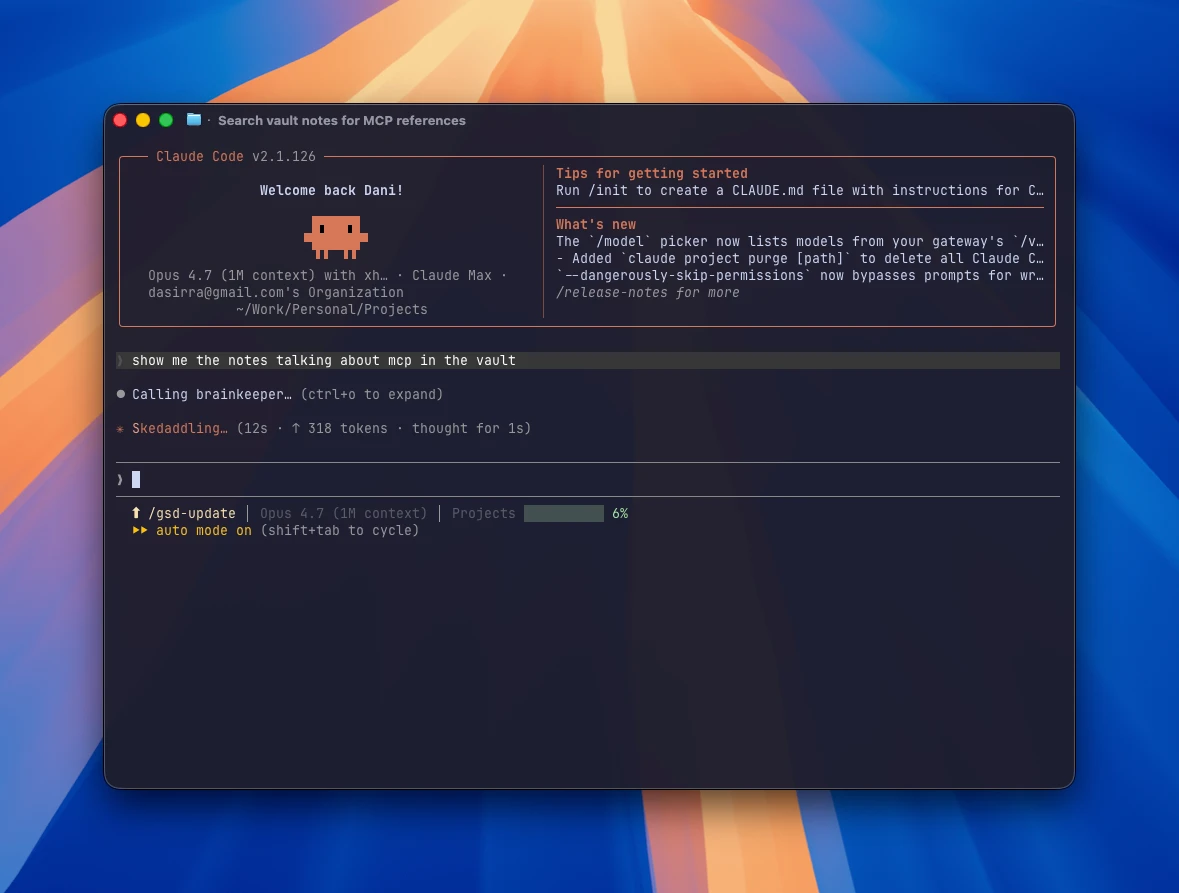
The agent calls find_by_tag against brainkeeper’s in-memory index. The MCP itself answers in milliseconds; the time you actually wait is the agent reasoning about how to phrase its reply, not the lookup.
Then:
“Show me orphans.”
The agent calls find_orphans(), which surfaces every note in the vault that fails spec validation. Missing updated? Listed. Bad date format? Listed. created after updated? Listed. The vault tells you what needs fixing.
4. The actual point
Now register the same MCP server with a different agent. Codex, OpenCode, anything that speaks MCP. Same uvx brainkeeper serve --vault ~/MyVault command, registered through that agent’s MCP setup.
Same vault. Same conventions. Same toolset. The agent on the other side has no CLAUDE.md, no rules file, no slash commands. It doesn’t need them. The conventions live in the spec, not the agent.
This is the part that’s hard to convey in writing. It works. You install brainkeeper once, you point each of your agents at it, and they all behave the same way against your vault. When a new agent comes out next quarter and you want to try it, the migration is the registration command. That’s it.
What this unlocks
Four things change when the conventions move out of the agent and into the spec.
Consistency that doesn’t drift
This is the unlock most people will feel first. Every write goes through schema validation. The agent can’t invent new field names. The routing rules pick the right folder regardless of what the agent thinks “feels right” today. Tags go through the index, not whatever the agent typed in the moment.
The “I asked the agent to capture a note” → “the note is in the right place with the right shape” loop becomes reliable. The Sunday cleanup sessions stop. The vault stays clean automatically. Boring, in a good way.
Agent portability
You stop writing instruction files. Every MCP-capable agent gets the same vault contract automatically. Switch from Claude Code to Codex, the conventions hold. Add OpenCode to the mix because you want a TUI workflow, the conventions hold. A new agent ships next year with capabilities Claude doesn’t have, you point it at brainkeeper, the conventions hold.
The migration cost goes from “rewrite all my conventions in this agent’s syntax” to “register an MCP server”.
A tool ecosystem (or the start of one)
The spec is a public document. Anyone can build for it. A web UI for browsing your vault that respects the spec. A migration tool that imports your old Notion export into a brainkeeper-shaped vault. A backup tool that knows about lifecycle rules. A linter that runs in your editor and flags spec violations as you type. None of these need brainkeeper’s permission. They just need to read SPEC.md and follow the rules.
This is the part I’m most excited about and the part with the most uncertainty. brainkeeper is a v0.1.1 project today. Whether the ecosystem actually shows up depends on whether the spec is good enough to build on, which is the kind of thing that takes years to know.
Data longevity
Your vault is a folder of plain Markdown files with YAML frontmatter. brainkeeper is MIT-licensed. The spec is in a public repo. The reference implementation is on PyPI. There is no SaaS in the loop, no auth provider, no API rate limit, no terms of service that can change. If brainkeeper as a project disappeared tomorrow, your vault would still open in any text editor and your conventions would still be documented in a Markdown file you control.
This is the same property that made Markdown win. The format is yours. The data is yours. The protocol that operates on it is open. Nothing here can be turned off, deprecated, or sunset.
FAQ
Does this replace Obsidian?
No. brainkeeper is the AI-access layer; Obsidian is the human-access layer. They’re complementary. Your vault on disk is the same. Obsidian opens it normally. The MCP server gives AI agents a structured interface that respects the same files. Use both.
Why MCP and not a REST API?
Because every modern AI agent speaks MCP. Claude Code, Claude Desktop, Codex, OpenCode, Cursor; all of them register MCP servers as a first-class capability. A REST API would force each agent to write a custom integration; MCP is the lingua franca.
Why Python?
The reference implementation is Python because Python is what I write fastest. The spec is language-agnostic. A Rust or TypeScript implementation would be welcome.
Can I use it without AI agents?
Yes. The CLI alone is useful. brainkeeper init bootstraps a vault. The Python library is exposed for anyone who wants to write their own tooling.
What about non-PARA folder structures?
Six layers are the default. The spec lets you rename them in brainkeeper.yaml and extend with additional folders alongside. The constraint is that the six canonical layer keys exist and route somewhere.